Product release notes - January 2026: New year, new control ✨
First release of 2026! This month's theme: more control over your content and how you work with it.
📊 Reports and insights
- Questions report — A new report showing all quiz questions you've asked across presentations, with stats on total responses, correctness breakdown, and accuracy. Helps you review, analyse, and reuse questions more effectively.
- AI insights for presentation reports (part 1) — Presenters can now see automatic AI-generated insights when viewing their presentation report—no prompts needed. After viewing the initial insights, you can ask follow-up questions to dive deeper.
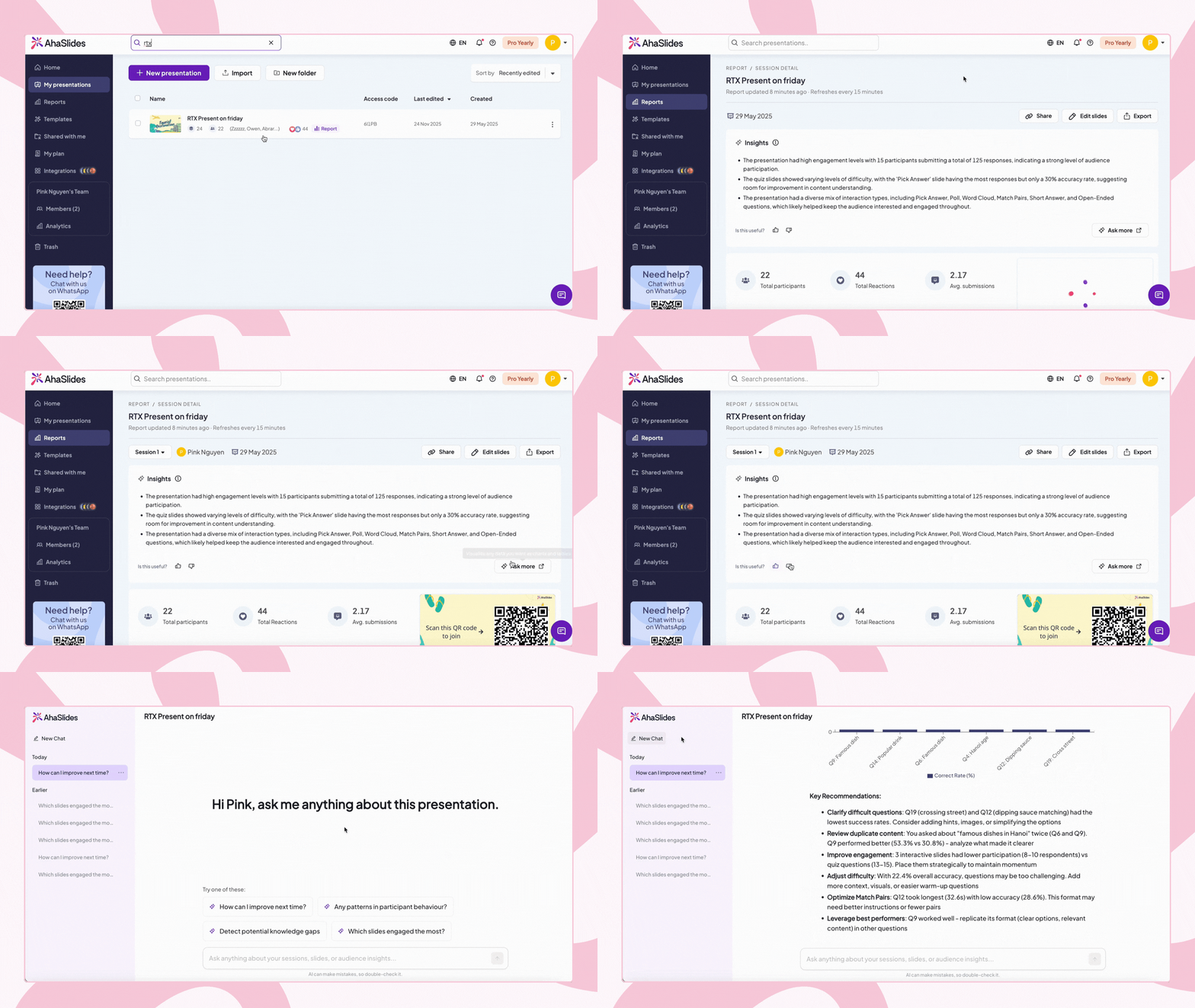

Current scope: This analysis doesn't yet filter by specific session selection. Session-specific insights will come in future updates.
- Ask AI on Master Report — New "Ask AI" button on the Master Report page. Clicking it opens a dedicated workspace where you can ask questions about trends, patterns, and insights across your entire presentation library.

📂 Content management
- Permanent deletion — You can now permanently delete presentations from your Trash—or empty the entire Trash in one go. No more wondering if that old draft is still lurking somewhere.
Click here for more information on how to recover a deleted presentation, in case you accidentally deleted it.
- Remove images — You can now permanently remove images from your My Images library.
- Presentation and folder search — The upgraded search now lets you find not only your own presentations and folders, but also everything you have access to—including shared presentations and shared folders.
- Sorting order remembered — Your presentation list now stays exactly how you like it. Sorting preferences are saved to your account and remembered across your root folder, subfolders, Shared With Me, and search results—across all devices.
📊 Quiz and import improvements
- Cheat prevention — We've added encryption to response data and audience information. Participants can no longer see quiz questions and correct answers by examining the preloaded data. This applies to both old and new versions of the navigation flow.
- Expanded import support — You can now upload jpg, png, xlsx, txt, docx, and other file types beyond just pptx and pdf. Images can be imported directly as slides; for other file types, AI will generate slides from the content.
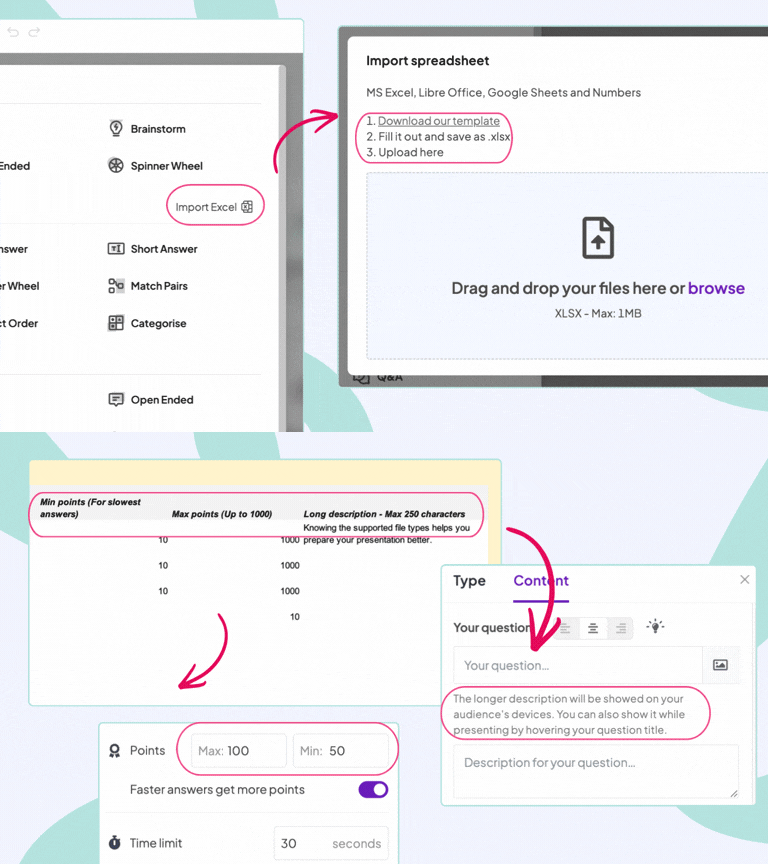
- Enhanced Excel import for quizzes — Import comprehensive quiz data via Excel—including long descriptions, max points, and min points for each question, all in one upload.
Click here to learn more about how to import quiz questions and download the template.
👤 Profile and account
- New look for My Profile — We've refreshed the profile page with a cleaner interface, streamlined navigation, and optimised layout for managing your personal info and security settings.
- Account manager info display — All members of Enterprise teams can now see their designated account manager on their profile menu, home page, and My Plan page. One-click options let you book a meeting or chat via WhatsApp.
✉️ Collaboration
Reply-to in invite emails — All invite emails (team invites, presentation and folder collaboration invites, etc.) now have the reply-to set to the inviter's email address instead of hi@ahaslides.com. When someone replies to an invite, it goes directly to the person who sent it—making collaboration faster and more direct.
Got thoughts on these updates? We'd love to hear from you—drop a comment below or reach out to us anytime. 💬
- From Cheryl, AhaSlides ❤️